Entradas

Tutorial from CG Matter - PBR for IDIOTS

Imagen
This is a tutorial from CG Matter - PBR for IDIOTS very useful and the principal idea is to understand the process and then Render an Image with your Textures. for this process we need to go to this site: https://texturehaven.com/ then go to Textures and Download All Maps. now you can create your Maps Images with AwesomeBump under Linux https://github.com/kmkolasinski/AwesomeBump Let's go to Blender - Edit - Preferences - Add-on and type Node Wrangler Render Engine: Cycles Feature Set: Experimental Material Properties: Setting - Surface - Displacement: Displacement and Bump Select Principled BSDF and click Shift + Ctrl + T and add the folder downloaded and decompressed. Add Modifier - Subdivision Surface - Adaptive Subdivision. Render Engine: Cycles Ubuntu Linux 20.10 GNOME 3.38.1 Blender 2.90.1

Design and Change a simple GNOME Desktop Icon

Imagen
Design and Change a simple GNOME Desktop Icon There are many ways to change a GNOME Icon and for now MenuLibre is a good option if you want a quick process but in this case we need to understand where are the root for the icons and then create a change but understanding where are the icons that we want to change. Installing MenuLibre sudo apt-get install menulibre As you can see the desktop icon Anthy Dictionary has a bad resolution and we will change it. Understanding Menulibre show the command for this app "kasumi" so this is a very important word and then we go to Nautilus and find "kasumi" and we can find two different places from this Icons, kasumi.desktop and kasumi.list and other kasumi files. Now we have to redesign in Inkscape the new Icon for Anthy Dictionary Editor. Don't forget use Inkscape as a sudo for save the icon in two different places. sudo inkscape /usr/share/pixmaps/kasumi.png /var/lib/app-info/icons/ubuntu-focal-universe/64x64/kasumi_kasumi...

Blender 3D Models

Imagen
Here you can find some models created under Blender 2.8 ready to download it. For the design I use the next tools: Booleans. Duplicate Objects. Array. Spin Duplicates. Extrude Electric Generator Fire Extinguisher Light Machine Download Blender3D Files All the designs are created under Blender 2.8 Cheers!!!

Cobreloa - Chilean Football Team

Imagen
You can find this .SVG created under Inkscape. Cobreloa: Chilean Football Team. Download Cobreloa .SVG Cheers!!!

GNOME Stickers 2019

Imagen
I was working in the design for the GNOME Stickers 2019 and the design you can find here and you can find the SVG. you are available to download and edit it with Inkscape . Don't forget to download the font Trebuchet in the same link. GNOME Stickers 2019 You can find the last Stickers: GNOME Beer And you can find the old GNOME Stickers  Cheers!!

Anime Show Santiago 2019

Imagen
Starting this month it was the Anime Show Santiago 2019 in Centro Cultural Estación Mápocho, I have to say there was very good Cosplayers and great people. Let me show some Pictures of the event: Fujifilm X-T1 Advanced Filter Effect Red Nice Cosplay For me this is the Best Cosplay in all Anime Show So if you wanna see all the Gallery you can visit my Flickr Album  Anime Show Santiago 2019

Mesh Align Plus - Blender 2.8

Imagen
Mesh Align Plus has been updated for Blender 2.8 and a new feature for "Align Planes" Download Mesh Align Plus Testing Mesh Align Plus v0.5.0 - Blender 2.8 First install this Add on from file The Idea in this picture is add th e three pieces into one First select the Grab Destination, we select the first vertex where I want the second piece and then we make click in "Grab Destination"   Then we select the vertex in the second piece, remember this piece it's gonna move into the first piece, and we click in Object And this is how this Add on work, very simple powerful and fast. Now we select the second base to align with the next piece and we click in Grab Destination And now we select the last vertex and we make click in object. And this is how we can use Mesh Align Plus in Blender 2.8

GNOME Wallpaper

Imagen
GNOME Wallpaper created under GIMP Feel free to download it from here

Annual GNOME Bugzilla Statistic 2018

Imagen
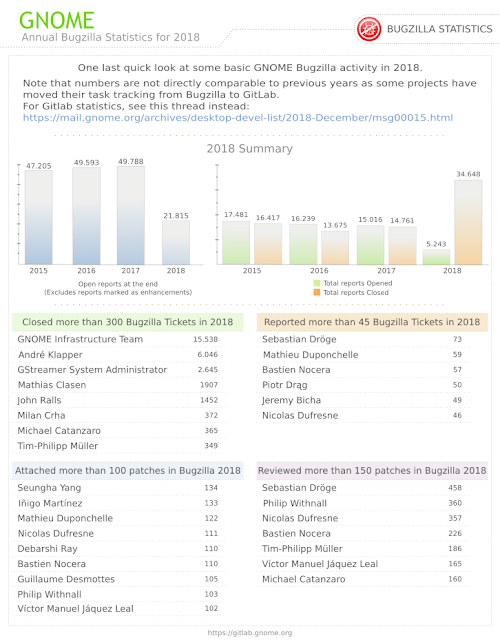
I have been working in a Design with Inkscape for the Annual GNOME Bugzilla Statistic for 2018, here you can see a picture but in the link you can access to the .pdf format. https://wiki.gnome.org/DanielGalleguillos/Bugzilla I want to thanks to Andre Klapper for his support to this design.

Junta GNOME Beer Chile 2019 + Wallpaper GNOME Chile

Imagen
Friends, to start this year has decided to make a GNOME Beer and thus strengthen the board of this group and we can raise the opportunity to generate activities this year as the GNOME Day. GNOME Beer Chile: City: Santiago Place: Kross Bar de Bellavista Date: Sábado 02 de Febrero Hour: 18:00 Hrs en adelante. Created with Blender 2.8 - Wallpaper de GNOME Chile.

3D Characters for Blender 3D using Adobe Face and MakeHuman

Imagen
In his tutorial we are gonna use two interfaces to create 3D characters and then you can Import to Blender 2.79 and 2.80 1.- Adobe Fuse 2.- Make Human Adobe Fuse CC under OSX The first step in Download and Install Adobe fuse from the Adobe Fuse website When you open adobe Fuse the software show you every step to create a 3D character as: Head Torso Leg Arm Then you can Customize any part of the body with Thin or Thick, then you create the Clothes for the Body. After to complete your Character we are gonna send it to  www.mixamo.com  and adding some Auto-Rigger. Here you can find the option for download the Character for Blender 3D into DAE extension. Into Mixamo we can add some Characters or Animations We Download the Character with DAE extension and we open it with Blender And here we are in Blender 2.8 with the new Character 3D And you can see this render from Mixamo into Blender 3D MakeHuman  OSX - Ubuntu Linux Makehu...